
Portnir
A focused Windows desktop app and CLI for answering one practical question: which process owns this listening port?
- Interfaces
- Desktop UI + CLI
- Core
- Shared Rust library
- Platform
- Windows 10 / 11
- Telemetry
- None
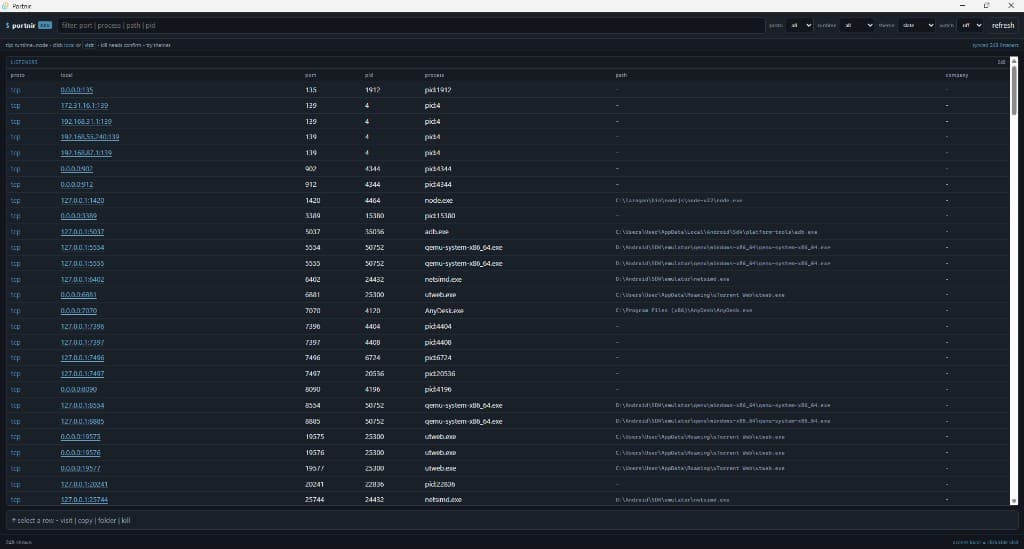
Port ownership should take seconds to understand.
Windows already exposes listening ports, but common command output makes developers scan dense rows and combine several tools before they can identify the process that matters.
Portnir narrows the view to local listeners, adds useful process context, and keeps the next actions close. It remains local to the machine with no account, cloud dependency, analytics, startup task, or resident background service.
Find the listener, understand it, then choose the next action.
List listening TCP endpoints and bound UDP sockets
Show local address, port, PID, process name, and image path
Search by protocol, address, port, process, path, or PID
Filter by protocol and detected language runtime
Open safe loopback and private-LAN HTTP addresses
Copy listener details or reveal the process in Explorer
Terminate listener processes only after explicit confirmation
Auto-refresh at two, five, or ten-second intervals
A visual desktop tool and a scriptable CLI stay in sync.
The Tauri interface and command-line binary both call the same Rust core for enumeration and process actions. That keeps filters, port checks, JSON output, and kill safeguards consistent across both ways of working.
- Matching CLI with stable JSON output
- Native Windows process and network APIs
- Read-only discovery with explicit kill confirmation
Use the setup wizard or keep a portable copy.
irm https://raw.githubusercontent.com/cyrstrstn/portnir/main/scripts/irm-install.ps1 | iexDownload the latest release